Submissions
Last updated Over 1 year ago
Introduction
The Submissions tab is a feature intended for distributors that aim to facilitate the tracking of new albums sent by labels.
On this page, you will be able to manage the new album submissions:
approve them,
reject them back to the user for modification,
prioritize those who need to be processed first,
or even tag them.
Approve a Submission
When a label sends an album, a new submission is created. If no additional changes are to be made, you can approve the submission and its album content in two different ways:
Via the Submissions tab
Click on the green checkmark '✔️'
Via the Album page
On the top right-hand corner of the page:
click on the 'Submission' buttons,
and then chose '✔️ Approve'
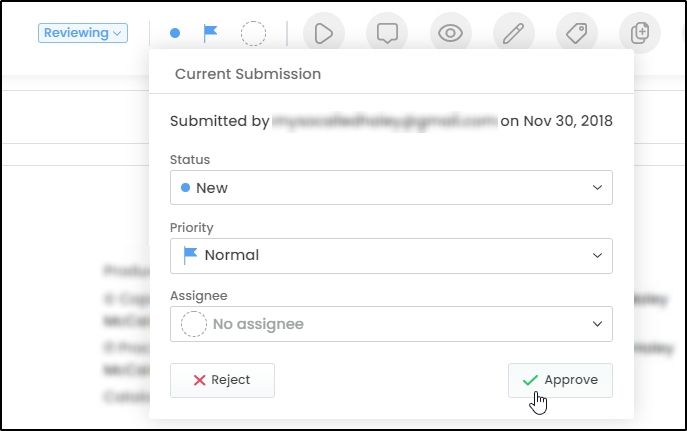
Once the submission is approved, you can continue to manage the album in Labelcamp (offers and deliveries to the platforms).
Reject a Submission
If an album sent by a user requires changes, you can reject the submission and send back the album to him/her in order to make the changes:
Via the Submissions tab
Click on the red cross mark '❌'.
Then, go to the 'Rejected' section, and click on the relevant product. In the comments, write in/describe the changes the user needs to do. The user will get a notification in Labelcamp and will also receive the info via email.
Via the Album page
On the top right-hand corner of the page, click on the 'Submission' buttons and then chose 'Reject ❌'.
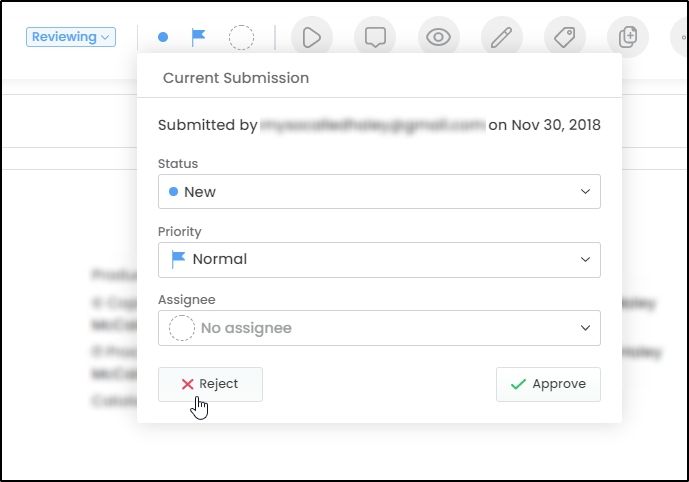
In the comments, write in/describe the changes the user needs to do. The user will get a notification in Labelcamp and will also receive the info via email.
Then, the album will appear in the 'Rejected' section.
Prioritization
In order to organize submissions to proceed, you can add a priority level.
There are 4 levels of priority:
Low
Normal
High
Urgent
A new submission is given a 'normal' priority by default.
It is then possible to sort and/or filter the submissions by priority/date/status/etc. using the drop-down menu or text field provided for this purpose.
Was this helpful?
Still need help? Ask the team