Profiles (/DSP Tag Names)
Last updated Over 1 year ago
'Profiles' (aka 'DSP tag names') can be used in the "Rights" section of Distributor, Contracts, Labels, and Products.
The main goal is to help set up the Rights more easily.
Thanks to those profiles, you can add DSPs to distribution rules just by choosing the relevant profile. For example:
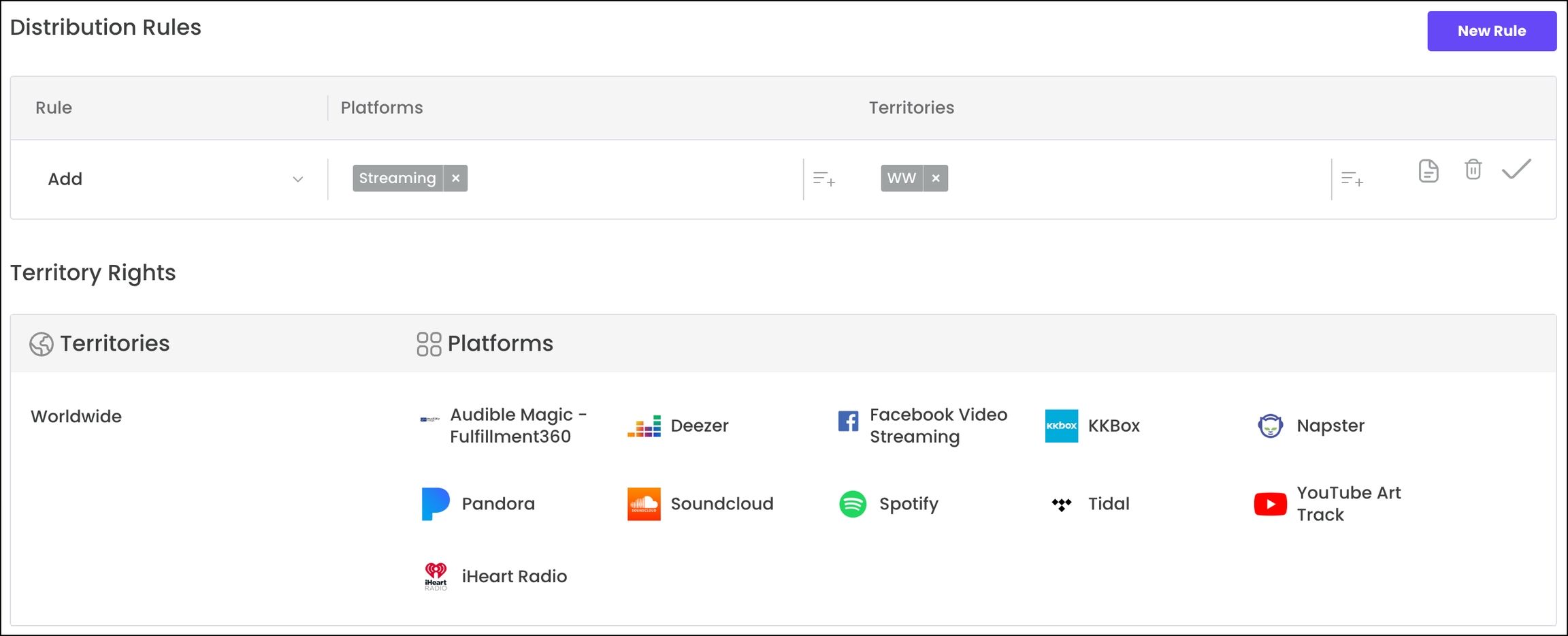
The second main goal is to make the addition/setup of new feeds easier:
Once you add a new DSP to an existing profile, the new DSP will be automatically added to all the Contracts/Labels/Products with this profile in their Rights.
For example, if you set a 'profile' for 10 DSPs and add a distribution rule with this profile, your contract/label/product will get those 10 DSPs in its Right section.
And, each time you add a DSP to this same profile, the rights of your contract/label/product will be updated with this new DSP automatically.
Please note that you should have only one profile per DSP, otherwise it could create a conflict with profile selection.
Was this helpful?
Still need help? Ask the team